AI Food Scanner: How It Works and When to Use It
Learn how an AI food scanner estimates calories and macros from photos, where it can go wrong, and how to use meal and label scans thoughtfully.

Quick answer
An AI food scanner uses a meal photo to identify likely foods and estimate portions, calories, and macronutrients. Some apps also scan nutrition labels. The results are estimates, not measurements of the food itself: hidden oil, recipes, and portion depth can change the answer. Use a scanner for convenient food awareness, and check labels or measured ingredients when accuracy matters.
Key takeaways
- Recognizing a food is not the same as measuring its calories.
- Meal photos and nutrition labels provide different kinds of evidence.
- Check portions, preparation, and hidden ingredients before trusting a result.
- Food grades cannot replace ingredient lists or individualized nutrition advice.
- PhotographShow the entire meal in good light.
- IdentifyReview the likely foods and preparation.
- EstimateCheck portions and hidden additions.
- InterpretUse the result as information, not certainty.
An AI food scanner promises a simpler starting point than searching for every ingredient in a food diary. Photograph lunch, review the estimate, and move on. That can be useful when detailed logging is too much work, but the convenience should not be confused with certainty.
The important question is not whether a scanner produces a number. It is whether you understand what that number represents. A meal photo contains clues about food identity and size; it does not reveal a recipe, weigh ingredients, or detect everything underneath a sauce.
What does an AI food scanner actually do?
A typical photo-based workflow involves several separate tasks. First, software interprets the image and identifies likely foods. Next, it estimates how much is present. Finally, those assumptions are connected to food-composition information to produce calories and nutrients.
That is a general explanation of this technology, not a claim about the undisclosed architecture of any particular product. Systems may use different image models, databases, prompts, and user inputs. Two apps can therefore interpret the same plate differently without either photograph changing.
The distinction between food recognition and nutrition estimation matters. Recognizing “rice” is easier than knowing whether it is plain, buttered, cooked in coconut milk, or mixed with oil. Identifying chicken does not establish the cut, edible weight, marinade, or cooking method.
Calories and macros answer different questions
Calories describe energy. Protein, carbohydrate, and fat describe major nutrient categories that contribute to that energy and perform different roles in the body. A scanner may estimate all of them, but each output inherits uncertainty from the original food and portion assumptions.
An attractive plate can still be energy-dense, and two meals with similar calories can provide different amounts of fiber or protein. Read a scan as a set of clues rather than a complete verdict on your diet.
Meal photos, labels, and barcodes are not interchangeable
| Input | What it helps establish | What still needs checking |
|---|---|---|
| Meal photo | Visible foods and approximate portions | Hidden ingredients, depth, recipe, leftovers |
| Nutrition label photo | Printed values for a stated serving | Scan transcription and amount actually eaten |
| Barcode lookup | Identity of a packaged product | Matching formulation, database freshness, portion |
| Measured recipe | Ingredient amounts and preparation | Yield, serving division, database match |
A label is generally a better starting point for a specific packaged product than guessing from its appearance. However, label values usually refer to a defined serving, not necessarily the entire package. Our guide to reading Nutrition Facts step by step explains that distinction.
How to make a meal scan more useful
Start with a photograph that includes the whole portion. Use ordinary bright light, keep the image in focus, and avoid framing a tiny section of a large plate. If foods overlap, consider how much is hidden rather than assuming the visible surface tells the whole story.
Then review the result in a deliberate order:
- Food identity: Did it recognize the main components correctly?
- Preparation: Is the food grilled, fried, breaded, or covered in sauce?
- Portion: Does the assumed amount look plausible?
- Additions: Are dressings, oils, toppings, and drinks accounted for?
- Consumption: Did you actually eat the entire photographed portion?
For a fuller capture routine, use our practical guide to calories from a photo. Better inputs cannot remove all uncertainty, but they can prevent avoidable mistakes such as photographing only half the meal.
A realistic example: the grain bowl
Imagine a bowl containing rice, chicken, vegetables, avocado, and dressing. The rice and chicken are clearly visible, but a generous layer of rice sits below the vegetables. The dressing could be mostly yogurt or mostly oil, and the chicken may have been cooked with additional fat.
The scanner has enough information for a starting estimate, not enough for a laboratory-quality nutrient analysis. If you made the meal, use what you know about the recipe to check the result. If it came from a restaurant, the menu or published nutrition information may be more informative than another photograph.
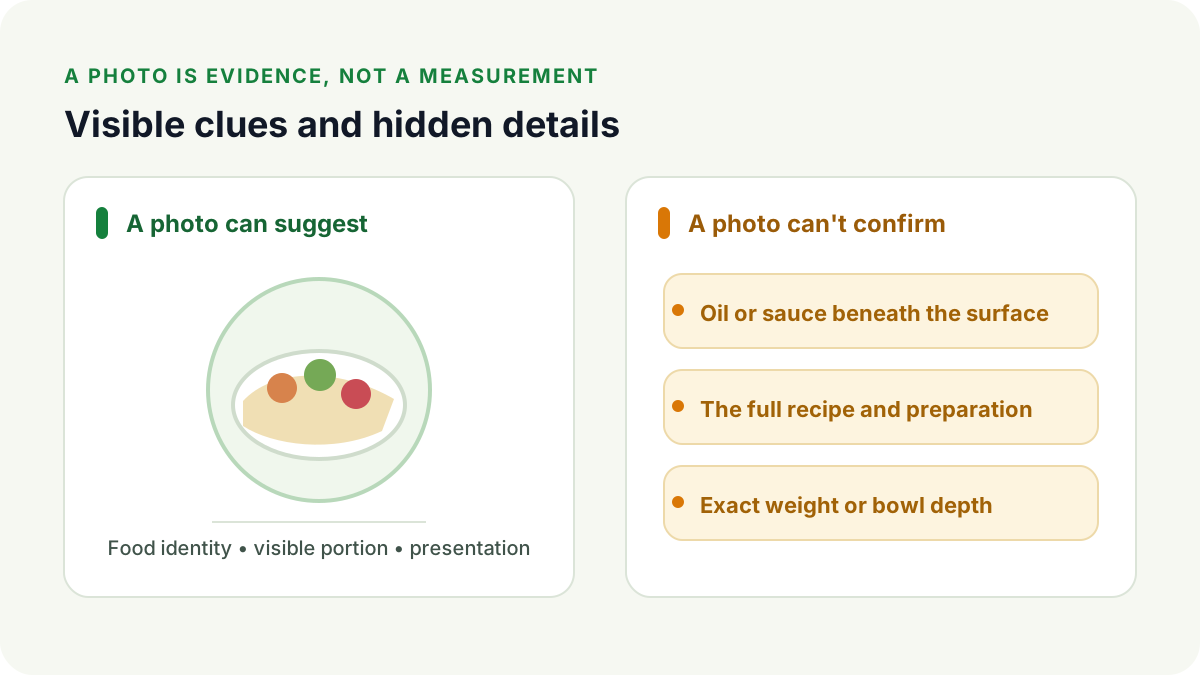
You do not need to turn this review into a long investigation. Focus on the few assumptions likely to change the result most: the base portion, the protein preparation, and calorie-dense additions. A cucumber slice rarely deserves the same attention as an unknown creamy dressing.
What can MeasureFood help with?
MeasureFood offers meal-photo and nutrition-label scanning with calorie and macro estimates, food-quality insights, and an app-specific S–E grade. Its public product pages also describe scan history and a nutrition dashboard.
Those features can reduce the effort involved in getting an initial overview of a meal. They do not establish independent clinical validation or guarantee a particular error rate. A grade is an interpretation within the app, not a government certification or a substitute for checking ingredients.
Want to see what a photo-first workflow feels like? Try MeasureFood Free, then compare the interpretation with what you actually know about your meal.
When is a scanner a sensible choice?
Photo scanning is most useful when the alternative is not recording anything at all, or when you want quick awareness of how meals differ. It can prompt useful questions: Where is the protein? How large is the grain portion? Did the dressing materially change the estimate?
It is less suitable as the sole evidence for tasks requiring tight precision. Medication dosing, allergy safety, medically prescribed restrictions, and specialized athletic nutrition may require validated measurements and professional guidance. A photo cannot reliably prove the absence of an allergen.
People with a history of disordered eating may find numerical tracking unhelpful or distressing. Food awareness can also mean noticing regular meals, variety, energy levels, and satisfaction without counting every calorie.
How should you judge accuracy claims?
Look for a clear testing method rather than a confident percentage. Useful validation describes which meals were tested, how reference values were obtained, whether portions were weighed, and whether users corrected initial results.
A peer-reviewed study of three general-purpose language models found substantial variation in estimates from standardized food photographs. That study was not a test of MeasureFood, nor proof that all current commercial apps perform identically. It illustrates why model names or polished interfaces are not enough to establish accuracy.
Our AI calorie-counter accuracy guide explains how to separate recognition claims from nutrient-estimation evidence without inventing a universal accuracy rate.
Choose a workflow you can understand
The most useful scanner is not necessarily the one that displays the most decimal places. It is one whose results you can interpret, question, and compare with available evidence. Keep clear labels and recipes when you have them; use photos when convenience is valuable.
At your next meal, capture the entire plate, review the main assumptions, and identify one useful observation. That is a more practical goal than expecting a camera to know everything you ate.
Frequently asked questions
Can a photo identify every ingredient?
No. A photo can suggest visible foods, but ingredients inside sauces, fillings, and mixed dishes may be impossible to identify visually.
Is an AI food scanner the same as a barcode scanner?
No. Photo scanning estimates from an image. Barcode scanning looks up a packaged product; a label scan reads the printed nutrition panel. Their inputs and limitations differ.
Can I use food scans for medical decisions?
Do not rely on photo estimates alone for insulin dosing, allergy decisions, or prescribed dietary restrictions. Follow your clinician's validated approach.
References
This article is general education, not medical advice. MeasureFood values are estimates. Read our editorial policy.


